Hotanya Ragtah
Open S3 buckets are one of those problems that should have been solved years ago. AWS has warned about them, added guardrails and turned the guardrails on by default, yet they still turn up all the time. This is the story of one I found by accident: what was in it, and what it took to get it closed.
How I stumbled on it
In late November 2024 I came across a LinkedIn post about Awseye, an OSINT tool from Plerion that lists the publicly visible resources tied to an AWS account ID.
Naturally I started clicking the “Surprise Me” button to look at random accounts. A few clicks in, I landed on an account belonging to Palo Alto Networks, with a handful of S3 buckets sitting open to the internet.
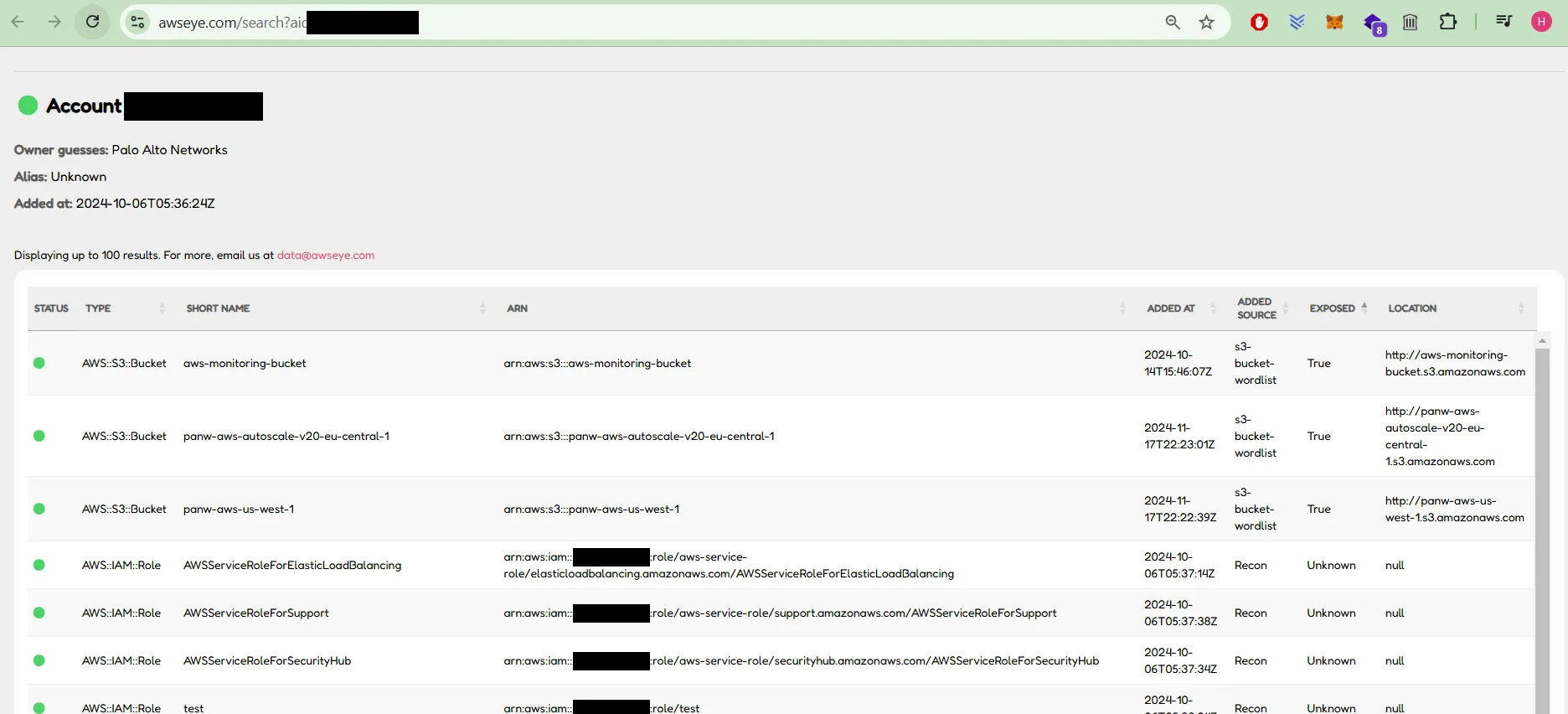
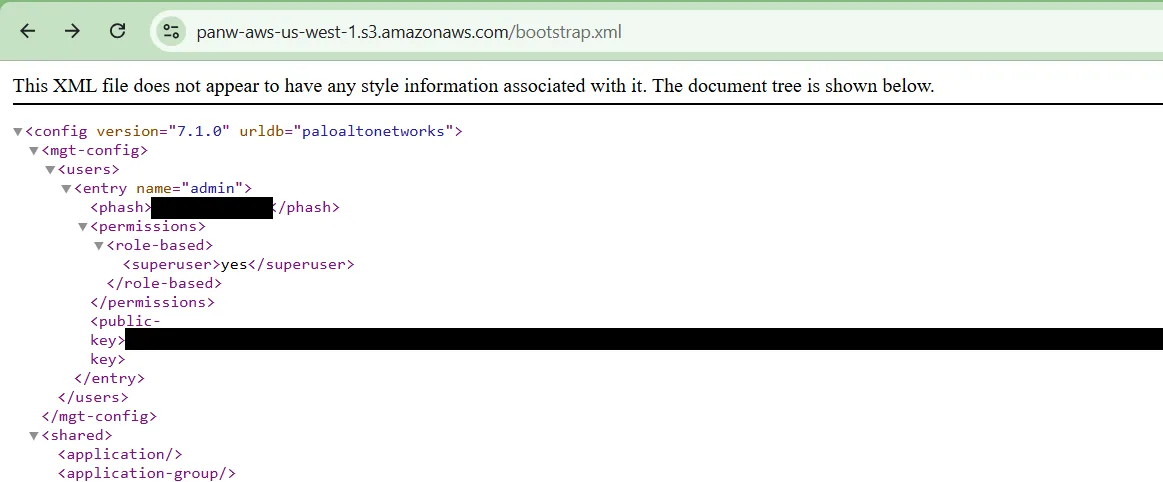
Inside were firewall templates, config files, internal IP addresses, usernames and source code archives. The best finds were two bootstrap.xml files. These are the configs a Palo Alto VM-Series firewall pulls down when it first boots, and they contained the password hashes for the admin and superuser accounts.
Why that matters
A firewall config and a list of internal IPs tell an attacker how a network is laid out and where it’s defended. That’s useful when you’re planning where to poke.
A hash isn’t a password, but it’s not far off. It can be taken offline and cracked at whatever speed your GPUs allow, and if the password is weak or reused anywhere, that’s game over. Leaving it in a public bucket means anyone can take it.
None of this is new. Booz Allen Hamilton leaked data through a misconfigured bucket. So did Breastcancer.org. In one of the worst cases, a marketing analytics firm left details on 123 million US households in a public bucket, which is nearly every household in the country. It keeps happening because it’s easy to do: one wrong policy, one forgotten test bucket, and it’s out there.
Reporting it (and waiting)
I reported it through Palo Alto’s responsible disclosure program the same day. Here’s how it went:
| Date | What happened |
|---|---|
| 26 Nov 2024 | I report the open buckets and list what’s in them: usernames, password hashes, configs, internal IPs, firewall templates and source code archives. |
| 27 Nov 2024 | Triage replies that low-impact config files without keys or credentials are out of scope, and asks which files have the hashes. I send the two bootstrap.xml URLs with the admin and superuser hashes. |
| 6 Dec 2024 | Validated. The fix goes to Palo Alto, and I’m offered a spot on the acknowledgements page once it’s fixed. |
| 12 Jan 2025 | I ask for an update. They’re still working on a patch. |
| 2 Feb 2025 | I mention the usual 90-day window and ask for a rough timeframe so I can plan this post. |
| 21 Feb 2025 | No update from Palo Alto. |
| 24 Feb 2025 | Day 90. Still not fixed. |
| 19 May 2025 | The fix is confirmed as deployed, 174 days after my report. I’m added to the acknowledgements page. |
| 26 May 2025 | I check again. One of the bootstrap.xml files is still public, superuser hash and all. I report it with a screenshot. |
| 2 Sep 2025 | A reply, 99 days later: an apology, a question about whether the file is still accessible, and a suggestion that I open a new ticket. |
| Early Sep 2025 | The last file is finally locked down, more than nine months after my first report. |
A couple of things stuck with me.
The first was the initial pushback. Internal IPs, firewall templates and source code weren’t enough to count. It only got taken seriously once I pointed at the password hashes.
The second was the time. Google’s Project Zero settled on 90 days as a fair window between reporting a bug and going public with it. That gives the vendor time to fix things without leaving users exposed forever. This fix was mostly flipping a bucket from public to private. It took nearly twice that window, and even then one file was missed. When I flagged that, the reply took more than three months. Closing everything off took more than nine months from start to finish.
The triage team was polite throughout and kept me in the loop whenever they had news. The delays sat with Palo Alto, not with them.
Why it’s not as simple as it looks
Looking back, I have more sympathy for the wait than I did at the time. From the outside, the fix looks like one setting. Inside a company the size of Palo Alto, someone has to work out who owns the bucket, whether anything still depends on it being public, and whether changing it will break a deployment somewhere. Then that ticket has to compete with everything else on that team’s plate.
It’s also worth being honest about the risk. The bucket shouldn’t have been public, and those files shouldn’t have been in it. But the configs looked like internal templates for systems that weren’t reachable from the internet. An admin hash is a lot less urgent when there’s no login page exposed to try it against.
How to keep your buckets out of a blog post like this
Most of what you need is already built into AWS. The trick is putting the pieces in place before someone like me goes looking.
Turn on Block Public Access at the account level. It’s been on by default for new buckets since April 2023, but older buckets may not have it. Setting it at the account level overrides every bucket, so one bucket can’t quietly opt out. There are four settings, and you want all of them on:
BlockPublicAcls: stops anyone adding new public ACLsIgnorePublicAcls: ignores any public ACLs that already existBlockPublicPolicy: stops anyone attaching a bucket policy that makes the bucket publicRestrictPublicBuckets: if a public policy is already in place, only your own account and AWS services can use it
Let things read a private bucket instead of making it public. Buckets usually go public because something needs to read from them and public is the quickest way to make that work. A firewall pulling its bootstrap config is a good example. Instead, give the instance an IAM role that can read only the bucket it needs. For a VM-Series bootstrap bucket, that looks like this:
{
  "Version": "2012-10-17",
  "Statement": [
    {
      "Effect": "Allow",
      "Action": "s3:ListBucket",
      "Resource": "arn:aws:s3:::example-bootstrap-bucket"
    },
    {
      "Effect": "Allow",
      "Action": "s3:GetObject",
      "Resource": "arn:aws:s3:::example-bootstrap-bucket/*"
    }
  ]
}
The firewall can still get its config, and nobody else can.
Keep credentials out of config files, or at least out of the ones you keep. Those bootstrap.xml files only mattered because they had admin hashes in them. If a config needs a credential to bring a system up, change that password after first boot so the copy sitting in S3 is useless. And if something was ever exposed, rotate it, even after the bucket is locked down.
Use SSE-KMS for anything sensitive. New objects are already encrypted with SSE-S3 by default, but that won’t help if the bucket is public, because S3 decrypts the object for anyone allowed to read it. SSE-KMS is different: anonymous requests can’t read KMS-encrypted objects at all, and anyone who reads them needs permission on the key as well as the bucket. That gives you a second lock if the first one fails.
Get alerted when something goes public. If you only use AWS’s own tools, start with IAM Access Analyzer, which flags buckets that can be reached from outside your account. AWS Config has managed rules for this too: s3-bucket-public-read-prohibited and s3-bucket-public-write-prohibited. Amazon Macie goes a step further and scans bucket contents for things that look sensitive, like credentials and personal data.
Use a CSPM or ASM tool if you have more than a couple of accounts. A cloud security posture management (CSPM) tool such as Wiz, Orca or AWS Security Hub connects to your accounts with read-only access and constantly checks for exactly this sort of thing: public buckets, secrets in files, overly broad roles. When one appears, it alerts you, usually within hours. An attack surface management (ASM) tool comes at it from the other side. It scans your internet-facing footprint the way an attacker would and tells you what’s exposed. Either one would have caught these buckets long before I stumbled on them. Neither depends on someone remembering to check.
When someone reports it, check you got all of it. A fix that misses one file isn’t a fix. Search your accounts for every copy of whatever was reported, not just the URLs in the ticket. A CSPM tool makes this a lot easier.
Wrapping up
This wasn’t a clever hack. I clicked a button on a free tool and found a security vendor’s firewall configs and admin hashes. The tools to prevent this are cheap, built in and well documented.
If you run anything in AWS, take ten minutes this week to check what’s public in your accounts. It’s better to find out yourself than from someone like me.